
Festival Lineup Slider Template
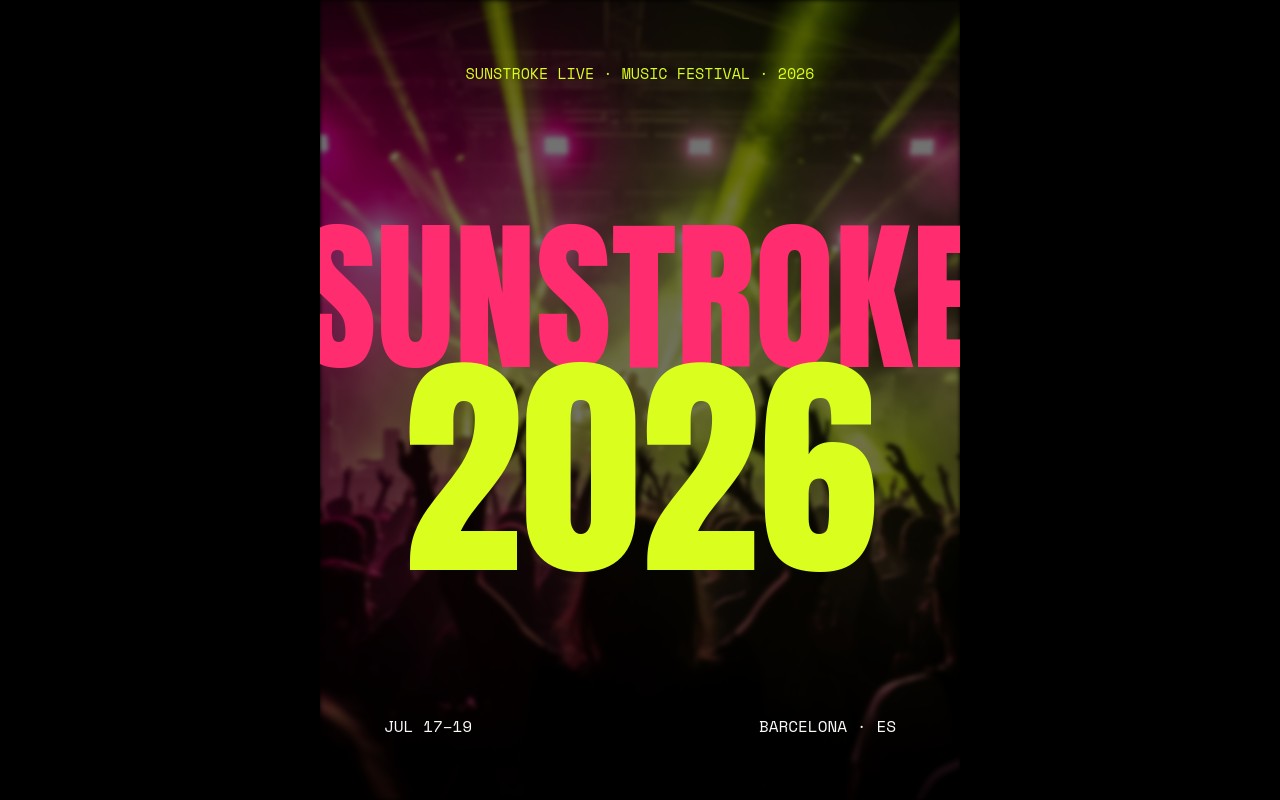
A festival lineup poster slider built for the screenshot, the social drop, and the wait-this-is-a-slider moment. Six slides cycle through a cover card, three day-by-day headliner reveals with cutout artist portraits floating over giant Anton type, a venue card, and a ticket CTA - all locked to a tight hot magenta, electric lime, and black palette. Open the template in Swiper Studio, swap the festival name and headliners for your own, and ship a multi-day lineup that looks nothing like the standard event hero.
The cover opens on a "SUNSTROKE / 2026" stack with crowd silhouettes burning through magenta and lime stage haze, then each day slide layers a 240px headliner name, a cutout artist portrait, three tier-2 acts in white, and eight tier-3 names in a two-column mono grid. The venue slide drops the type at full bleed for a "PARC DEL FORUM" reveal, and the closer flips to a magenta field with a lime "BUY TICKETS" headline and an early-bird link block. The palette is brutal on purpose - one accent at a time, never both, so the eye always knows where to land.
#What Makes This Template Stand Out
Cutout Headliners That Punch Through the Type
Each day slide stacks a giant Anton headliner name behind a cutout artist portrait and a tier-2 act list in front. The result reads like a hand-built festival poster, not a generic carousel - the artist sits inside the composition instead of beside it, which is the move that makes the slide stop feeling like a slider.
Brutal Three-Tier Lineup Hierarchy
Headliner at 240px, three tier-2 acts at 90px in white, eight tier-3 names at 32px in two mono columns. The scale jump is intentional - it tells visitors exactly who is opening, who is closing, and who is filling the small print on a beer ticket, without a single design label.
Two Loud Accents, One Black Ground
Hot magenta `#ff2d6f` and electric lime `#dafe1d` swap roles per day - lime headliner on Friday, magenta on Saturday, white on a magenta field on Sunday. The cover and venue slides drop back to pure black so the type can breathe before the next day hits.
Day Labels, Dates, and Stage Maps in Mono
Space Mono carries the day tags, dates, and tier-3 columns, which keeps the editorial poster feel without competing with the headliners. Edit a venue address or a list of openers and the alignment stays clean - no fiddly CSS, no broken columns.
Scale-In Animation That Lands the Cutout
The headliner type drops in with letter-scale, then the cutout portrait lands with a slow scale-in so the artist arrives after the name. Tier-2 and tier-3 acts cascade in last. The choreography mirrors how a poster reveals itself when you walk up to it - title, face, lineup, fine print.
#Who Should Use This Template
This template is for music festival organizers and event promoters who already trade on a strong visual identity and want their lineup announcement to feel as designed as the festival itself. The cover, day-by-day slides, venue card, and ticket CTA give you the entire announcement story in a single embed - drop it on the homepage, push it to Instagram in screenshots, and reuse the slides as ticket-tier social cards.
Multi-day event teams and club night residencies can use the same structure for a three-night residency, a weekend takeover, or a curated showcase. Each day slide is fully editable, so you can keep three days for a traditional festival, drop to two for a weekend, or scale up to four or five for a longer run without losing the brutal hierarchy.
Conference organizers, comedy festivals, and esports tournament producers get a poster-grade lineup that finally treats speakers, comics, or competing teams the way music headliners get treated. Swap the cutout portraits for your keynote speaker, your headline comic, or your top-seeded roster, and the same magenta and lime energy carries straight across the category.
#Best Use Cases
- ✓Multi-day music festival lineup announcements with headliner and supporting act tiers
- ✓Club night and warehouse rave residencies running three to five-night runs
- ✓Comedy festival and stand-up showcase lineups featuring a headliner per night
- ✓Esports tournament brackets announcing rosters, prize pools, and stage maps
- ✓Conference speaker reveals where keynotes get headline treatment over a session list
- ✓Boutique brand activations and pop-up week schedules with a daily host or guest
- ✓Underground label showcase tours promoting a roster across multiple cities
- ✓Sports fan event days featuring a marquee athlete and supporting program
#How to Customize
- Open the Festival Lineup template in Swiper Studio - you will see six slides covering the cover, three day reveals, the venue card, and the ticket CTA.1
- Rename the festival on the cover - retype "SUNSTROKE" and "2026" in the stacked type block, then update the date range and city in the mono lines at the bottom corners.2
- Replace each day headliner - click the giant Anton name (ARLO, KAEL, NOVA) and retype with your own artist. Adjust the lime, magenta, or white color to match how you want each day to feel.3
- Swap the cutout portraits for your real artists - upload a transparent PNG, or run a regular photo through Swiper Studio's AI background removal to get a clean cutout that sits on the black or magenta field.4
- Edit the tier-2 and tier-3 artist lists - keep the three large support names in white and the eight small names split across two mono columns to preserve the brutal hierarchy.5
- Update the venue slide - retype "PARC DEL FORUM" with your real venue, then update the street address, postal code, and transit line in the mono lines at the bottom.6
- Retarget the ticket CTA - update the "BUY TICKETS / 04.15.26" deadline, change the pass tiers and prices, and point the link block to your ticketing provider.7
- Tune the responsive breakpoints so the 240px headliner type scales down comfortably on tablet and phone, then publish to CDN or export to React, Vue, HTML, or Webflow.8
#Frequently Asked Questions
- Can I change the festival name and days to match my event?
- Yes. The "SUNSTROKE / 2026" cover, day-by-day headliner slides, venue card, and ticket CTA are all plain text in Swiper Studio. Click any line to retype the festival name, dates, city, headliner, and tier-2 and tier-3 artist lists - the brutal Anton hierarchy holds together at every size.
- How do I swap the headliner cutout portraits for my own artists?
- Each day slide layers a cutout artist portrait between the giant headliner name and the supporting acts. Replace the image with your own transparent PNG by clicking the image element and uploading a new file. If your photo has a background, you can run it through Swiper Studio's AI background removal to get a clean cutout that sits cleanly on the magenta or black field.
- Will the 240px headliner names stay readable on mobile?
- Yes. The template ships with breakpoints at 375px, 768px, and 1024px, so the headliner type scales down from 240px on desktop to roughly 120px on phone without breaking the layout. You can fine-tune each breakpoint in the responsive panel if you want a tighter or looser feel on small screens.
- Can I add a fourth day or extra stage to the lineup?
- Yes. Duplicate any day slide, rename it to "Day 04 / Monday" or "Stage B", swap in the new headliner cutout and artist list, and drop it into the order you want. Swiper navigation and pagination handle the new slide automatically without any extra setup.
- What fonts does this template use and can I change them?
- The lineup is built on Anton as the condensed display face and Space Mono for the day labels, dates, and tier-3 artist columns. Both are Google Fonts and load automatically. Swap either typeface from the style panel - the brutal hierarchy stays intact as long as you keep one tall condensed display paired with a mono.
#Related Templates

#Related Resources
- Swiper Studio for Hero Sections
- Swiper Studio for Landing Pages
- Swiper Studio for Marketers
- Swiper Studio for Agencies
Ready to Build Your Slider?
Pick a template, customize it visually, and export production-ready code to React, Vue, Next.js, HTML, Webflow, and more. No coding required.








