
Wine Shop
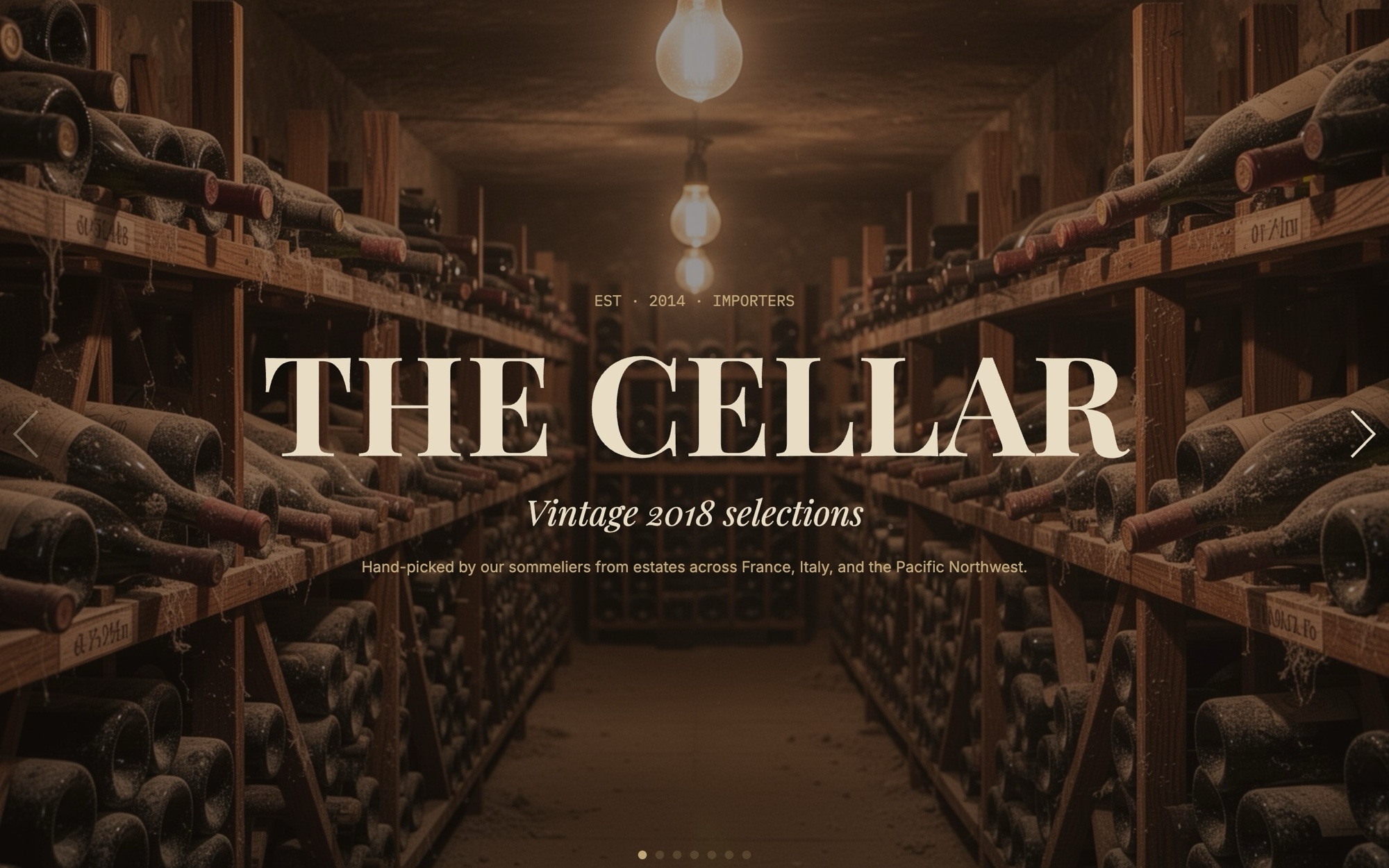
A wine merchant slider that pairs atmospheric vineyard and cellar photography with four bottle cards from different regions. Seven slides walk through a curated selection - "THE CELLAR - Vintage 2018 selections" cover, a Tuscan vineyard region intro, four bottle cards (Bordeaux, Burgundy, Tuscany, Oregon), and a reserve and membership CTA - each composed for the warmth and intimacy the category trades on.
Playfair Display in 700 italic carries the display type and Inter handles the body. The slider mixes fade for the hero atmosphere slides and slide for the bottle cards, both at 700ms. The palette runs #1c1410 espresso, #e8dcc4 parchment, #7a1c2a burgundy, and #c2a878 vintage gold - the kind of warm cellar-toned scheme that suits both heritage merchants and natural wine bars.
#What Makes This Template Stand Out
Seven-Slide Cellar Sequence
Cover, vineyard region intro, four bottle cards across Bordeaux, Burgundy, Tuscany, and Oregon, and a reserve or membership CTA. The structure mirrors the way wine merchants already curate a tasting flight or a monthly selection - introduction, regional context, the bottles themselves, and an invitation to subscribe.
Mixed Fade and Slide Effects
Hero atmosphere slides (cover, vineyard, sommelier, cellar) use a fade at 700ms so photography resolves in place. The four bottle cards use a regular slide effect so they read as a browse-able row. The contrast between cinematic and catalog pacing is what makes the carousel feel like a wine list rather than a generic product feed.
Playfair Display Italic and Inter
Playfair Display in 700 italic handles the wordmark and headlines with the kind of high-contrast classical letterform that signals heritage. Inter handles tasting notes, region labels, and prices - keeping the technical detail crisp so the romance of the display type is balanced by readable specs.
Espresso, Parchment, Burgundy, and Vintage Gold Palette
The four-color palette runs deep enough to feel like a candlelit cellar and warm enough to flatter both red and white bottle photography. Burgundy and vintage gold are restrained until they hit a tasting note label or a price tag - which is when they earn their accent role.
Reserve and Membership CTA
The closing slide is wired as a reserve or membership invitation. Wire the button to your wine club signup, allocation form, or shop checkout, and rework the supporting copy to match the offer - subscription, allocation, or tasting reservation - without rebuilding the slide.
#Who Should Use This Template
This template is built for wine merchants, natural wine bars, and online wine clubs that want a digital storefront that feels as considered as the bottles they sell. The mix of vineyard atmosphere and bottle catalog is exactly how the category teaches its own customers - region first, then producer, then bottle - and the carousel structure mirrors that flow.
Sommelier-led wine programs and restaurant beverage directors can use the same structure to publish a tasting menu or a featured selections page. Replace the cover with your venue name, swap the bottle cards with what is currently on the list, and the slider works as a digital list, a daily features carousel, or an embed for the booking confirmation email.
Web designers and agencies working on hospitality and beverage clients will find this useful as a production-ready starting point. The palette, typography, and effect mix are tuned for the category, so most of your time goes into bottle photography selection and tasting copy rather than rebuilding the layout.
#Best Use Cases
- ✓Wine merchant homepages introducing a vintage selection or seasonal allocation
- ✓Online wine club landing pages presenting the next monthly shipment
- ✓Restaurant and bar beverage program pages showcasing the current wine list
- ✓Natural and biodynamic wine shop storefronts on Shopify, Squarespace, and WooCommerce
- ✓Vineyard direct-to-consumer pages featuring estate bottlings and library wines
- ✓Subscription and allocation signup pages for cult and small-production producers
- ✓Tasting event landing pages for in-store flights, masterclasses, and virtual tastings
- ✓Press and trade landing pages distributed to wine writers, sommeliers, and buyers
#How to Customize
- Open the Wine Shop template in Swiper Studio by clicking 'Use This Template' above1
- Replace the cover wordmark and "Vintage 2018 selections" tag with your merchant or club name and the actual selection theme2
- Swap the vineyard hero, four bottle photographs, and the sommelier and cellar atmosphere shots with your own imagery3
- Update each bottle card with the producer, region, vintage, tasting notes, and price - or hide price for allocation-only releases4
- Adjust the espresso, parchment, burgundy, and vintage gold palette in the project style panel if you need a brighter natural-wine feel or a darker heritage cellar tone5
- Tune the fade and slide speed at 700ms to taste, and decide whether to use parallax on the atmosphere slides for added depth6
- Wire the closing CTA to your real wine club signup, allocation form, or checkout, and update the membership copy to match the offer7
- Export to HTML, React, Vue, Next.js, Web Component, or Webflow, or publish to CDN for embedding into a Shopify or Squarespace wine merchant storefront8
#Frequently Asked Questions
- Can I swap the four bottle regions for my own selection?
- Yes. The default sequence covers Bordeaux, Burgundy, Tuscany, and Oregon - each with bottle photography, region label, tasting note, and price. Swap each bottle image with your own product shots and update the region, vintage, tasting notes, and price in the visual editor. Add or remove bottle slides to match the size of your monthly selection.
- How does the fade and slide effect mix work?
- The hero slides (cover, vineyard, sommelier, cellar) use a fade effect at 700ms so atmospheric photography settles in place. The four bottle cards use a regular slide effect so they read as a browse-able row. You can change either effect in the project params panel and the rest of the layout adjusts automatically.
- Can I rebrand THE CELLAR cover and Vintage 2018 selections?
- Absolutely. The cover slide reads "THE CELLAR - Vintage 2018 selections" set in italic Playfair Display. Replace the wordmark with your wine merchant or club name and update the vintage or selection theme - "2020 selections", "Spring releases", "Sommelier picks" - to match what you are actually featuring.
- Will the espresso, parchment, and burgundy palette work for my brand?
- The default palette of #1c1410 espresso, #e8dcc4 parchment, #7a1c2a burgundy, and #c2a878 vintage gold is tuned for heritage wine merchants and natural wine shops alike. Every color is editable in the project style panel - lean darker for an old-world cellar feel or lighten the parchment for a brighter natural-wine bar aesthetic.
- How do I publish this on a wine club or merchant site?
- Publish from Swiper Studio to CDN and paste the embed snippet into your storefront, or export the slider as a React or Vue component for headless setups. Paste into Webflow drops it directly into a wine club landing page as native Webflow elements, and the standalone HTML export works on any platform that accepts an HTML embed.
#Related Templates
#Related Resources
- Swiper Studio for E-commerce Stores
- Swiper Studio for Product Carousels
- Swiper Studio for Landing Pages
- Swiper Studio for Small Businesses
Ready to Build Your Slider?
Pick a template, customize it visually, and export production-ready code to React, Vue, Next.js, HTML, Webflow, and more. No coding required.








