
#New Features: Export to Images & PDF, and Include Media in Downloads
We're excited to announce two new additions to the Swiper Studio export toolkit: Export to Images and PDF and Include Media toggle for project downloads!
#Why This Matters
Sometimes you need your slider content outside of the web. Whether it's for a client presentation, a design review, or print materials, having your slides as images or a PDF makes it easy to share and repurpose your work:
- Presentations: Drop your slide images directly into Keynote, PowerPoint, or Google Slides.
- Design Reviews: Share a PDF with your team or client for quick feedback without needing to send a link.
- Print Materials: Use the high-resolution PNG exports for print-ready assets.
- Archiving: Save a visual snapshot of your project at any point in time.
#How It Works
-
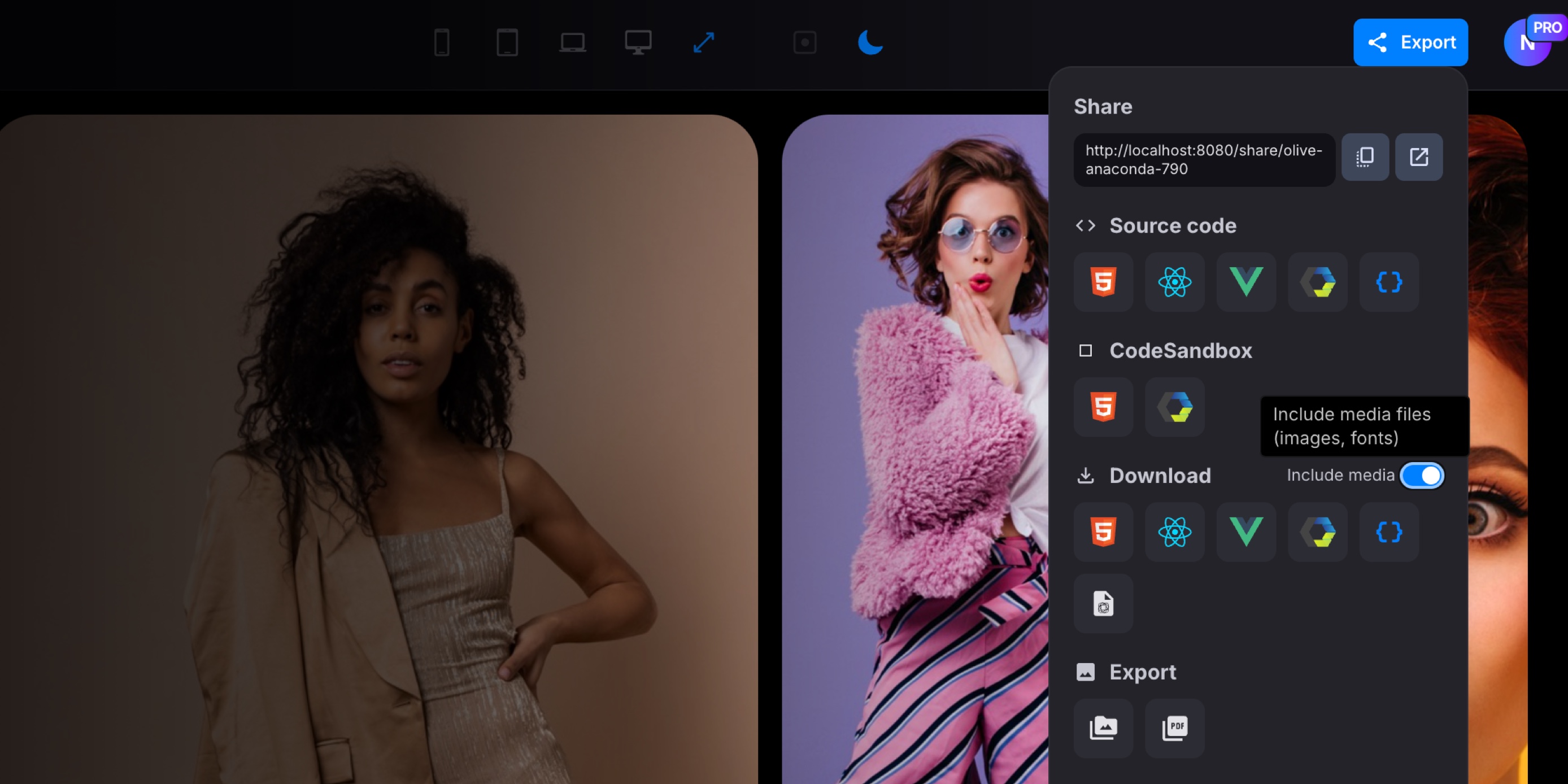
Open the Export modal from the editor.
-
In the new Export section, you'll see two options:

- Images - Exports each slide as a separate high-resolution PNG image, delivered as a zip archive.
- PDF - Exports all slides into a single multi-page PDF document, with one slide per page.
- Click your preferred option and wait for the export to complete. The file will be downloaded automatically.
The exported images and PDF pages match your slider's dimensions and aspect ratio, so what you see in the editor is exactly what you get in the export.
#Technical Details
Each slide is rendered on the server using a headless browser, ensuring pixel-perfect results that include all your custom styles, fonts, images, and effects. Navigation controls and animations are automatically hidden during capture to produce clean, static output.
For PDF export, the slide images are assembled into a multi-page document on the client side, keeping the process fast and lightweight.
#Include Media in Downloads
We've also added an Include media toggle to the Download section of the export modal. When enabled, all media files used in your project (images, fonts, etc.) are automatically bundled into the downloaded zip archive alongside the source code.
Previously, exported projects referenced media via CDN URLs, which required an internet connection to display correctly. With this option turned on, all media files are downloaded from the CDN, included in a media/ folder inside the zip, and all URLs in the exported code are rewritten to point to the local files. This means your downloaded project is fully self-contained and works offline right out of the box.
This is especially useful when:
- Sharing Projects: Hand off a complete, working project to a colleague or client without worrying about external dependencies.
- Offline Development: Work on your slider locally without needing an internet connection.
- Archiving: Keep a fully self-contained backup of your project with all assets included.
#Get Started Today
Try out the new Export to Images and PDF feature and the Include Media toggle in Swiper Studio and take your projects to the next level!
Got feedback or ideas for more export options? We'd love to hear from you!








